
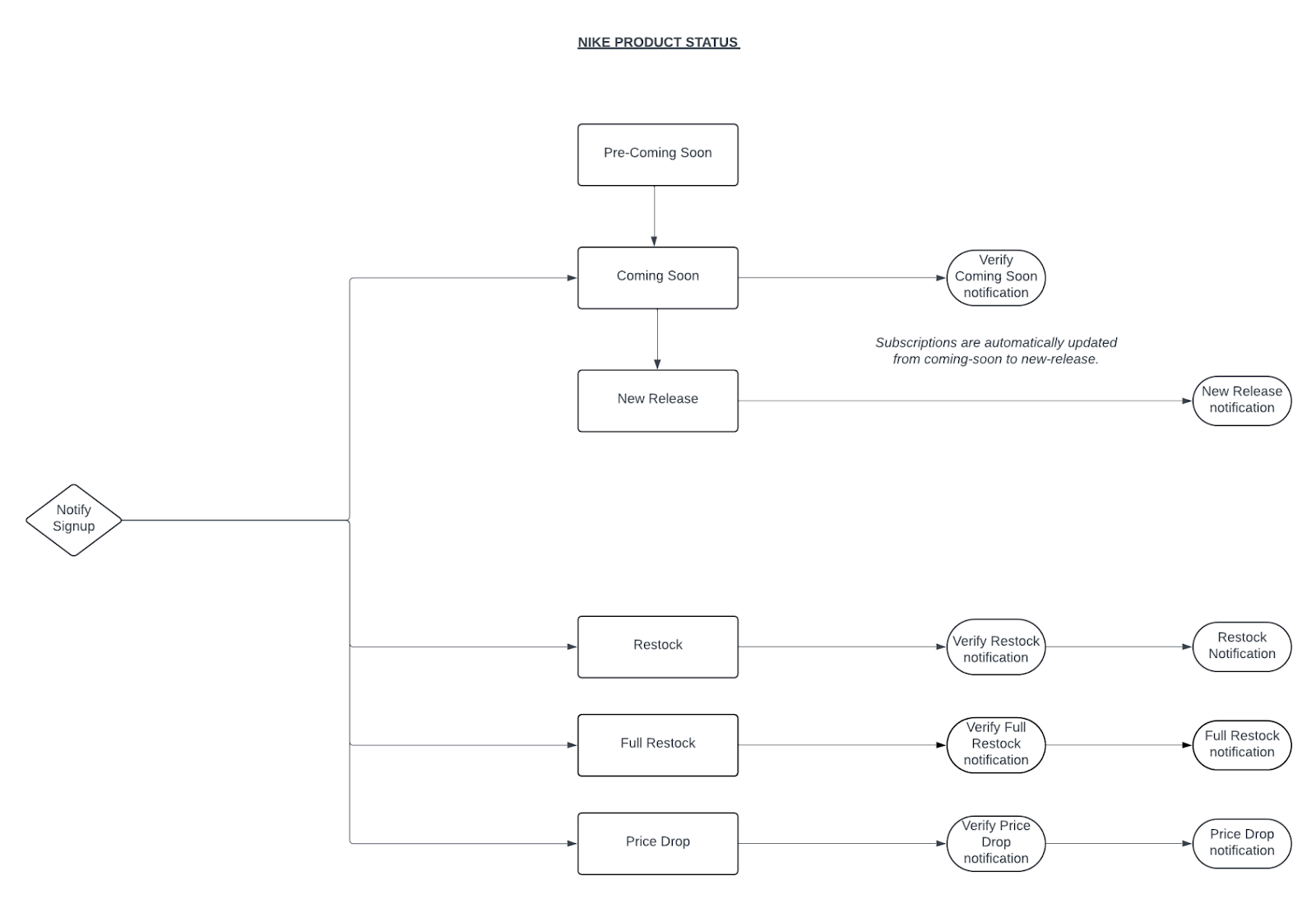
Managing product statuses efficiently is crucial for any e-commerce platform, particularly for a major brand like Nike. The diagram provided outlines a systematic flow for handling various product statuses, ensuring that customers are notified promptly at different stages of the product lifecycle. This article will delve into the detailed process flow and its importance for developers managing similar systems.
The process flow for Nike product statuses is divided into several key stages, each with specific triggers and notifications:
- Pre-Coming Soon
- Coming Soon
- New Release
- Restock
- Full Restock
- Price Drop
Each stage involves specific actions to ensure that customers are informed about product availability and changes in status.
Product Status Lifecycle
Detailed Breakdown
Pre-Coming Soon
Trigger: Products are identified for upcoming release.
Monotote Plugin (Notify): In development.
Publisher Webhook: Currently not supported.
Coming Soon
Trigger: Products transition from Pre-Coming Soon to Coming Soon.
Monotote Plugin (Notify) :
Subscriptions are automatically updated from Coming Soon to New Release, ensuring customers are continuously informed without needing to re-subscribe. No specific notification is sent.
Publisher Webhook: n/a
New Release
Trigger: Products are officially released.
Monotote Plugin (Notify) :
“New Release” notification is sent to subscribers.
Publisher Webhook: Example payload:
{ "parentSku": "NUK-pL37z4", "sku": "NUK-FR-DC0774-001-1000013446", "status": "new-release", "country": "FR", "language": "fr", "name": "Air Jordan 1 Low", "styleCode": "DC0774-001", "size": "", "color": "", "affiliate_url": "https://www.awin1.com/cread.php?awinmid=16328&awinaffid=829315&clickref=monotote&clickref6=Monotote&p=https%3A%2F%2Fwww.nike.com%2Ffr%2Ft%2Fchaussure-air-jordan-1-low-pour-pL37z4", "image_url": "https://static.nike.com/a/images/t_PDP_1280_v1/u_126ab356-44d8-4a06-89b4-fcdcc8df0245,c_scale,fl_relative,w_1.0,h_1.0,fl_layer_apply/192bd1e3-9fd1-4f94-9f0e-799e443357e9/chaussure-air-jordan-1-low-pour-pL37z4.png#40100bb66e9f7cbca2e01f38efbd62678621e6da1ec8e829"}Restock
Trigger: Products that were previously sold out are back in stock.
Monotote Plugin (Notify) :
“Restock” notification is sent to interested customers.
Publisher Webhook: Example payload:
{ "sku": "NUK-6GgqGD", "url": "https://www.awin1.com/cread.php?p=https%3A%2F%2Fwww.nike.com%2Fgb%2Ft%2F6GgqGD&awinmid=...&awinaffid=...&networkref2=cs1_3&clickref=monotote-restock&clickref6=Monotote&", "image": "https://static.nike.com/a/images/t_PDP_1280_v1/28e4d5fe-d1fd-44ca-8296-89dc87aa88ed/sportswear-club-older-french-terry-trousers-6GgqGD.png", "status": "restocked", "style_code": "DC7211-010", "product_name": "Older Kids' (Girls') French Terry Trousers Nike Sportswear Club", "size_price": { "S": 134.99, "M": 134.99, "L": 134.99 }}Full Restock
Trigger: A FULL restock event (all sizes are available again)
Monotote Plugin (Notify) :
“Full Restock” notification is sent.
Publisher Webhook: In development.
Price Drop
Trigger: Reduction in product price.
Monotote Plugin (Notify) :
“Price Drop” notification is sent to customers who might be interested due to the price change.
Publisher Webhook: Currently not supported.
For end-users (via the Monotote Plugin (Notify))
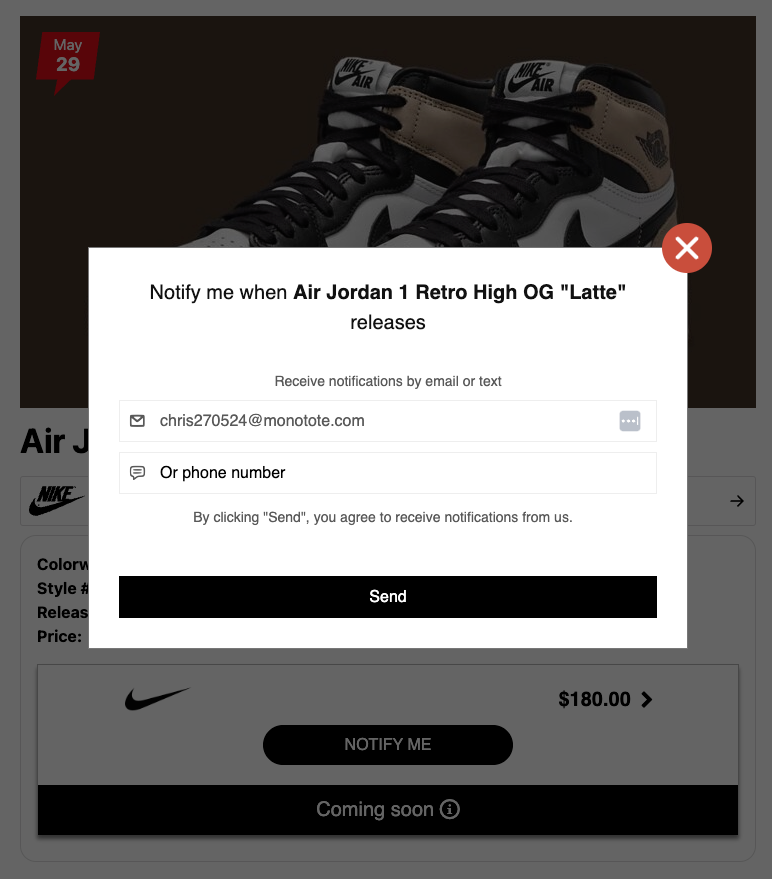
Customers can sign up for notifications via SMS and/or email at any point, starting from the Pre-Coming Soon stage. Their subscriptions are handled dynamically, ensuring they receive timely updates without needing to re-subscribe at each stage.
This functionality is enabled by default in our size widgets & product walls.
Example subscription form in the Monotote plugin:
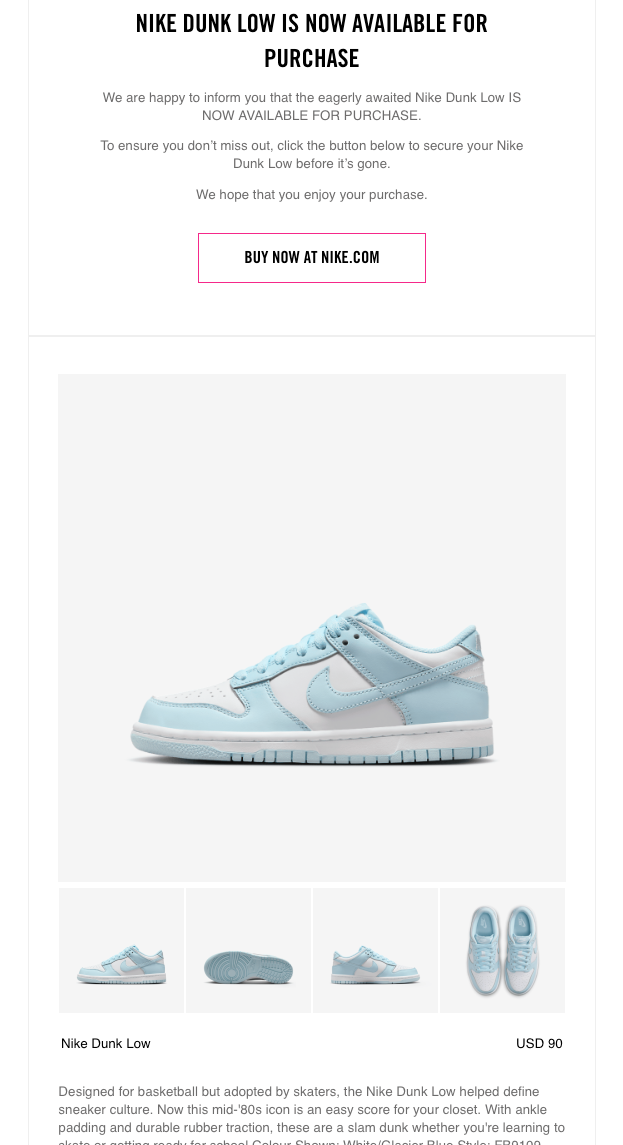
Example notification:
For publishers (via Publisher Webhooks)
Webhooks are a powerful tool that developers can leverage to create dynamic and responsive applications. They offer a multitude of opportunities to enhance functionality, improve user engagement, and streamline processes.
Real-Time Updates
Webhooks enable real-time communication between different systems. Instead of constantly polling for updates, your application can receive notifications as soon as an event occurs. This is particularly beneficial for keeping users informed about changes instantly.
Improved User Experience
Webhooks can significantly enhance the user experience by providing timely and relevant information, making interactions more personalized and engaging. Send tailored notifications to users based on their preferences and behaviors, such as recommending products they might be interested in.
Scalable Solutions
Webhooks allow you to build scalable solutions that can handle increased loads and complex workflows with ease. This is crucial for growing businesses and applications with a large user base. Implement an event-driven architecture where webhooks trigger microservices to perform specific tasks, ensuring your application can scale efficiently. Feed real-time data into analytics platforms to provide up-to-the-minute insights and dashboards, helping businesses make informed decisions quickly.
Enabling webhooks
Give your webhook a name, enter your webhook url, and choose a catalog.
Finally, choose the triggers you want to activate for the chosen catalog. Keep in mind we always send webhooks via the POST http verb.
Example webhook payload
[ { "sku": "NUK-6GgqGD", "url": "https://www.awin1.com/cread.php?p=https%3A%2F%2Fwww.nike.com%2Fgb%2Ft%2F6GgqGD&awinmid=...&awinaffid=...&networkref2=cs1_3&clickref=monotote-restock&clickref6=Monotote&", "image": "https://static.nike.com/a/images/t_PDP_1280_v1/28e4d5fe-d1fd-44ca-8296-89dc87aa88ed/sportswear-club-older-french-terry-trousers-6GgqGD.png", "status": "restocked", "style_code": "DC7211-010", "product_name": "Older Kids' (Girls') French Terry Trousers Nike Sportswear Club", "size_price": { "S": 134.99, "M": 134.99, "L": 134.99 } }]